About this piece
Written for Squarespace Circle — Squarespace's professional community for web designers and freelancers. Audience: working Squarespace designers looking to expand their toolkit and offer more value to eCommerce clients. Goal: drive organic search traffic for product-feature queries while positioning product blocks as a versatile, high-value design tool — not just a basic store element.
Using Our Product Blocks in Website Design
Product blocks are a simple, no-code solution for promoting your client's products and driving conversions — pulling information directly from existing store items and merchandising them anywhere on their site.
- Before you begin: prerequisites for product blocks
- Use cases: drawing attention, organizing, gating, and more
- Creative ways to use product blocks
- Best practices: content, images, and quick view
Squarespace product blocks are a key tool for promoting your client's products and driving conversions on their online store. These blocks ensure a seamless shopping experience by pulling information directly from existing items on store pages and merchandising them on other areas of a website. This means you and your client won't have to double your work when writing product descriptions or selecting images.
Product blocks are a simple, no-code solution to elevate your web design offerings. They give you the creative freedom to work with custom layouts and can be added to any page of your client's website, such as within a blog post or other content area. Product listings can also be styled to fit your client's brand for an even more consistent customer experience.
In this article, we'll explore what businesses benefit from implementing product blocks and how to use the blocks creatively and effectively.
Before you begin
In order to use product blocks, your client will need to have an enabled store page set up that contains the product you want to display. The product will also need to be visible and published, meaning it is available for purchase.
The following are questions to consider when determining if your client's website is a good fit for product blocks:
- Does your client have a clear brand identity?
- Do they have strong and consistent product images?
- Can their products be tagged, sorted into groups, or curated?
- Does their site have a content-focused area, like a blog page?
- Does your client have gated content that would benefit from being promoted to a wider audience?
- Do your client's products or services offer opportunities for cross-selling or upselling?
Use cases for product blocks
Clients selling products or select services online may benefit from including product blocks throughout their online store. The following are more specific examples of use cases for product blocks.
Draw attention to one product or service
If your client wants to highlight a particular product (think seasonal or limited edition item), try placing a product block on their website's landing page. The product block will serve as the page's focal point and will draw customers' attention.
Present products in an intuitive way
If your client has a blog, place an inline product block within the text to highlight items or services related to the article's topic. Including the product blocks directly on the page saves customers from having to search and navigate elsewhere — ultimately driving sales.
Organize information
Product blocks are great for organizing products by tags, descriptions, titles, and more. For example, if your client runs an online clothing store, you can use multiple product blocks to sort clothing by type — tops, pants, outerwear, and shoes.
Promote gated products
Clients can use Member Sites to set up gated stores within their websites. By placing product blocks elsewhere on the website, you enable non-members to purchase typically gated products, increasing the opportunity for sale.
When designing your client's website, you can move the store page to the Not linked section of the pages panel, removing it from the navigation menu while keeping it enabled. From there, design the landing page with the single product or service they are selling. This will emphasize their offering and give it a clean, simple URL.
At the end of a blog post, add a summary block to display all of the items mentioned in the post. Using product blocks to promote a gated product on a non-gated area of your client's website is also an opportunity to advertise their Member Area. Learn more about mastering Member Sites.


Inline product blocks placed within a Squarespace blog post — keeping customers on-page and driving conversions without navigation friction.
Creative ways to use product blocks
Product blocks can come in handy even if your client doesn't sell products or services. The following are some creative ways you can use product blocks to elevate their website:
- Promote a spot in a paid newsletter sponsorship
- Canvas for donations or crowd-funding
- Collect product pre-orders
- Use display tags to mark items as "bestsellers" to entice buyers
- Highlight a mystery bag or limited edition product
- Draw attention to a time-sensitive deal
- Upsell, cross-sell, and show related products in a summary block or carousel
- Use as a workaround with clients that want to use Squarespace's "Add to cart" and eCommerce capabilities, but without the visual limitations of the product page

Product blocks used creatively — here surfacing a curated collection outside the main store page.
"The less friction, the higher the sales — enabling quick view allows customers to add items to their cart without ever leaving their current page."
Best practices
The following tips will show you how to get the most out of product blocks' capabilities and content design features.
Share the essentials — and get creative
Include basic product details, such as item title, price, and product description, but save the lengthy details for the product page. This approach will create a stronger and more impactful visual and make the content blocks more consumer-friendly.
Include a call to action. This can be as simple as "Add to Cart," or you can customize the button text to suit the brand's voice with content that relates to the item or business.
For a seamless shopping experience, enable the product quick view feature. This allows customers to add items to their cart without leaving their current page — the less friction, the higher the sales.
Select images to fit your client's branding
A product block will display the product's featured image from the product page. With this in mind, you should choose a featured image that will capture a customer's attention.
Consistency (and good lighting) is key for strong product photos that convert visitors into customers. In order to maintain this consistency, you can suggest easy-to-apply techniques to your clients, such as keeping the same background themes or sticking to one color palette.
Depending on the client's brand, contextualizing products with props or a background might help visitors envision the items more clearly. Ultimately, you'll want to choose photos that create the most cohesive look for your client and establish a memorable brand identity. Learn more about creating a solid brand identity for your clients.
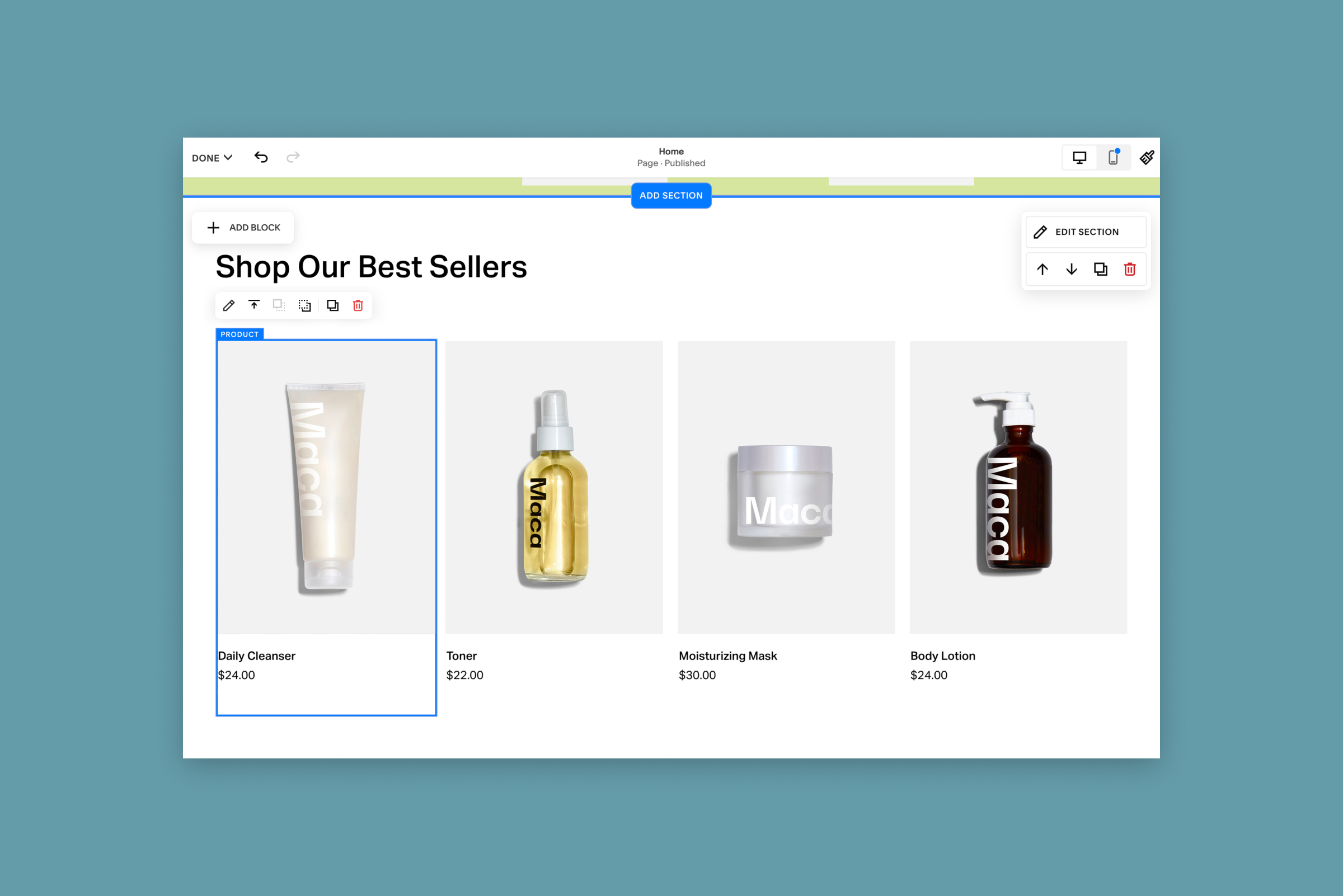
Quick view enabled on a product block — fewer clicks to purchase means lower drop-off and higher conversion.